
AKSHAERP · EXPENSE MANAGEMENT
Expense Management
Control employee claims, company-paid operating expenses, Petty Cash, Cash Advances, mileage, per diem, policy compliance and accounting without mixing operational evidence with General Ledger posting.
AkshaERP supports
AkshaERP Expense Management supports employee claims, company-paid operating expenses, Petty Cash, Cash Advances, mileage and per-diem controls, policy evaluation, accounting distributions, General Ledger posting/reversal, dashboards and Enterprise Reports.
- Employee Expense Claims with receipts, policy evaluation and accounting distributions
- Direct Expense Vouchers for company cash, bank, card and Petty Cash expenses
- Petty Cash Funds with custodian, imprest/minimum controls and recorded/reserved/available balances
- Cash Advance request, issue, Expense Claim/Cash Return settlement and outstanding balance control
- Mileage and Per Diem rate setup with effective-dated server-authoritative calculations
- Expense Categories with GL, tax, receipt and payment-eligibility defaults
- Expense Policies for limits, documentation, timing and compliance controls
- Confirm when approval is not configured and a protected Submit boundary when it is configured
- Source-linked General Ledger posting, Journal viewing and controlled accounting reversal
- Expense Dashboard plus claim, summary, policy-violation and accounting-distribution reports
START HERE
Choose the right expense path
Start with who paid and how money moved. This prevents employee reimbursement, company-paid spend, Petty Cash and advances from being mixed into the wrong transaction.
EMPLOYEE / CLAIMANT
Claim what I paid personallyUse My Expenses for employee-paid business costs, receipt capture, mileage or per diem, policy checks and reimbursement accounting.
Open My Expenses guide →BRANCH / FINANCE
Record a company-paid expenseUse Direct Expense when the company pays immediately by cash, bank, company card or an operating Petty Cash fund.
Open Direct Expense guide →CASH CUSTODIAN
Operate a Petty Cash fundMaintain the fund, record controlled cash movements, monitor physical balance and connect operating expenses to accounting.
Open Petty Cash guide →MANAGER / FINANCE
Issue and settle an advanceRequest, approve, issue, account and settle employee Cash Advances while keeping outstanding balances visible.
Open Cash Advances guide →DECISION MAP
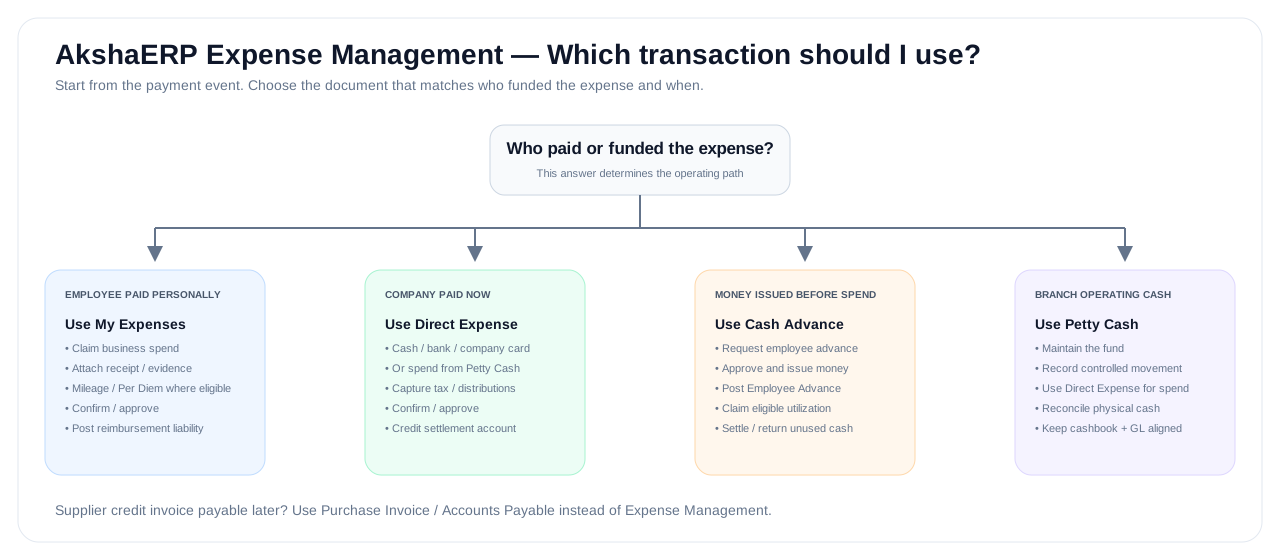
Who paid? Start from the answer
This visual separates reimbursement, company-paid spending, advances and Petty Cash before users choose a transaction.
COMMON TASKS
Choose by what you need to do
Open the operating guide for the task in front of you.
OPERATING MODEL
Run Expense Management as three connected responsibilities
Good expense control starts with configuration, moves through real business evidence and approvals, and ends with deliberate posting, settlement and management visibility.
SET UP / GOVERN
Policy and accounting foundation
- Expense Categories and GL defaults
- Expense Policies and receipt rules
- Mileage and Per Diem rates
- Petty Cash funds
- EXM accounting application settings
CAPTURE / APPROVE
Operational expense control
- Employee Expense Claims
- Direct company-paid expenses
- Cash Advance requests and issues
- Petty Cash movements
- Confirm / Submit / Approval controls
ACCOUNT / MONITOR
Posting, settlement and visibility
- Post Accounts to General Ledger
- Employee reimbursement liability
- Advance utilization and cash return
- Accounting reversal with audit trail
- Dashboard and Enterprise Reports
FUNCTIONAL FLOWS
Follow the path that matches how the expense happened
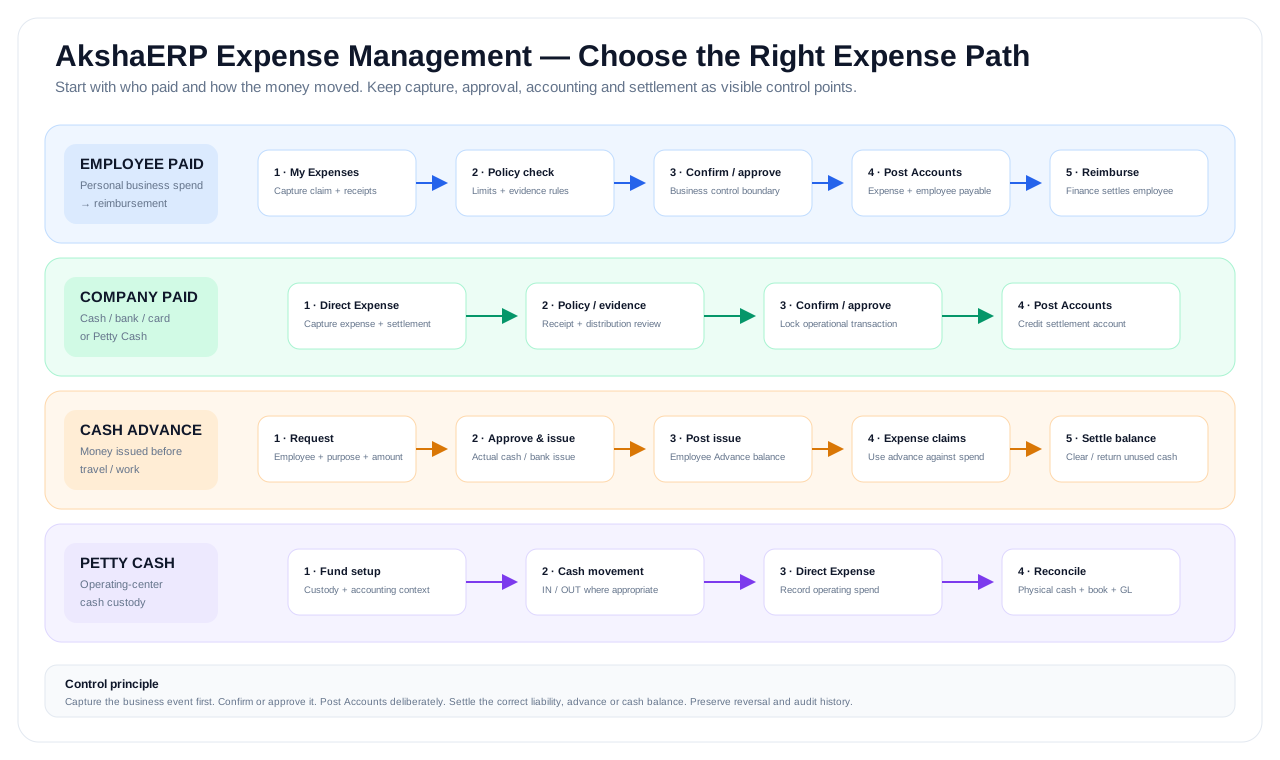
The four flows below cover the normal operating patterns. Each one reaches accounting differently because the settlement responsibility is different.
EMPLOYEE PAID
Employee claim → reimbursement
Use when an employee paid a genuine business cost personally.
COMPANY PAID
Direct Expense → settlement account
Use when the company paid immediately from cash, bank, card or Petty Cash.
MONEY ISSUED FIRST
Cash Advance → utilization → settlement
Use when an employee receives company funds before the related travel or work.
OPERATING CASH
Petty Cash → physical and financial control
Use for controlled branch/operating-center cash custody and movement.
PROCESS MAP
See the four expense paths at a glance
Use this map when deciding which transaction should own the expense and which balance or settlement account should be affected.
RESPONSIBILITIES
Keep business evidence, approval, cash custody and accounting distinct
Expense control becomes stronger when each role owns the evidence and decision appropriate to that role.
EMPLOYEE / CLAIMANT
Provides the business evidenceCaptures the expense accurately, chooses the right category, attaches receipts and explains the business purpose before submission.
MANAGER / APPROVER
Controls business legitimacyReviews policy exceptions, business purpose and approval responsibility before the transaction proceeds to accounting.
BRANCH / CASH CUSTODIAN
Controls physical operating cashMaintains Petty Cash custody, records genuine cash movement and ensures branch cash evidence agrees with system activity.
FINANCE / ACCOUNTS
Controls financial postingReviews distributions, tax and settlement accounts, posts the journal, manages reimbursement/advance balances and uses reversal when needed.
ACCOUNTING CONTROL MAP
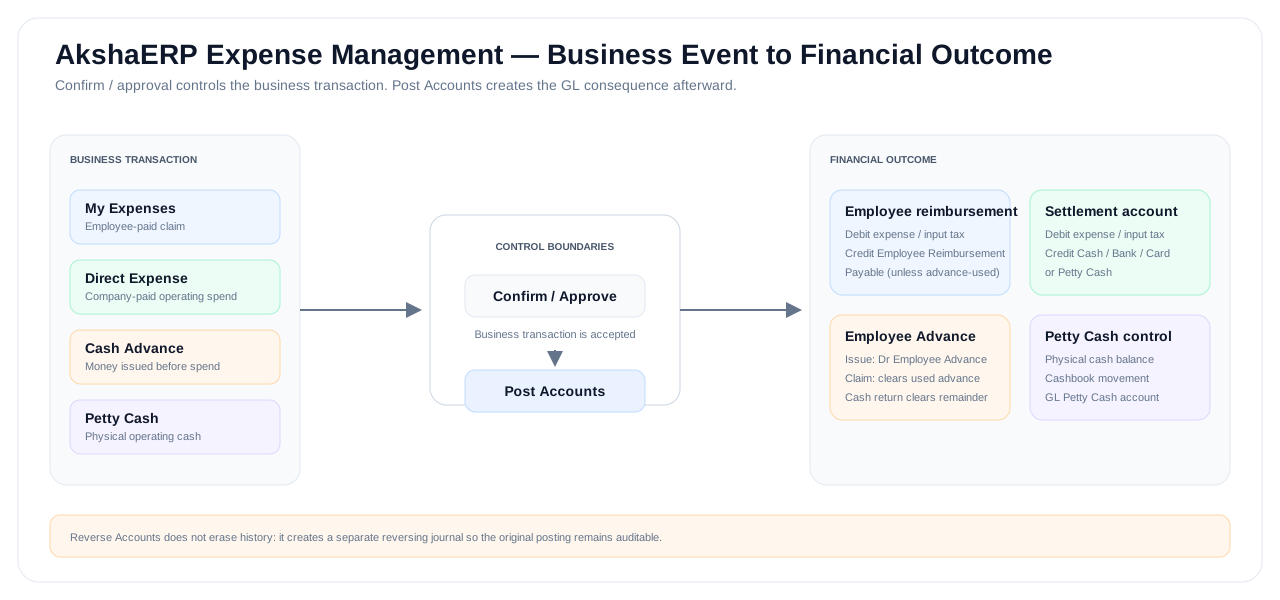
See what each expense path ultimately affects
The accounting event is separate from operational confirmation. Post Accounts creates the financial consequence for the selected path.
FUNCTIONS
Explore Expense Management by business responsibility
Use the function groups below to move from the overview into the operating page you need.
Employee expenses
Capture costs paid personally by employees and move them through policy, approval and reimbursement accounting.
Company-paid expenses
Record operating costs paid immediately by company cash, bank, card or Petty Cash.
Petty Cash control
Maintain operating cash funds, cashbook movement, physical balance and traceable accounting.
Employee advances
Control money issued before travel or work and settle it against expenses or cash returned.
Policy and rates
Define what can be claimed, what evidence is required and how mileage/per diem amounts are calculated.
Visibility and control
Review spend, exceptions, outstanding advances and Petty Cash health from one management view.
REFERENCE
Need the accounting and control detail?
The overview stays task-oriented. Expand this section only when you need transaction-selection rules, setup order, posting boundaries or accounting outcomes.
DETAILED REFERENCEExpense controls, setup and accountingExpand reference
Choose the correct transaction
Transaction selection
| Business event | Use | Why |
|---|---|---|
| Employee paid a business expense personally | My Expenses | Creates an employee claim and, after accounting, an employee reimbursement liability. |
| Employee spent against an issued Cash Advance | My Expenses + Cash Advance settlement | Expenses clear the employee advance instead of creating reimbursement payable. |
| Company paid immediately from cash or bank | Direct Expense | Posts the operating expense directly against the selected settlement account. |
| Edition center / branch paid from its Petty Cash fund | Direct Expense -> Petty Cash | Reduces the physical fund and posts the expense/GL together. |
| Manual Petty Cash replenishment/opening/adjustment | Petty Cash | Controls cashbook movement independently of a Direct Expense. |
| Employee requires funds before travel/work | Cash Advances | Tracks request, issue, settlement, outstanding amount and accounting. |
| Supplier sends a credit invoice payable later | Purchase Invoice / AP | The supplier liability, due date and payment lifecycle belong to Accounts Payable. |
| Worker cost belongs to payroll | HR / Payroll | Payroll ownership and statutory processing remain outside EXM. |
Recommended setup sequence
- 1. Create Expense Categories with correct expense GL defaults, tax/receipt controls and allowed payment responsibilities.
- 2. Create Expense Policies for limits, receipt rules, timing and compliance where required.
- 3. Configure Mileage Rates and Per Diem Rates when those claim types are used.
- 4. Create Petty Cash Funds for branches/edition centers that hold operating cash.
- 5. Configure EXM Accounting App Settings, especially Employee Reimbursement Payable and Employee Advance Account.
- 6. Confirm that the accounting period and General Ledger accounts are ready before production posting.
- 7. Configure an EXM approval template only where the approval execution flow is intentionally enabled for that environment.
Confirm, Submit and Post Accounts are different controls
When no active approval template exists for the EXM function, the action is Confirm. The document becomes operationally confirmed and can proceed to accounting.
When an active approval template exists, the action is Submit and the transaction is held at the approval boundary until it reaches an approved state.
Post Accounts is separate. It creates the General Ledger Journal Entry only after the document is in a permitted confirmed/approved state.
Accounting outcomes
Typical accounting
| Scenario | Debit | Credit |
|---|---|---|
| Employee-paid Claim | Expense distributions + recoverable input tax | Employee Reimbursement Payable |
| Cash-Advance Claim | Expense distributions + recoverable input tax | Employee Advance |
| Direct company-paid expense | Expense lines + recoverable input tax | Settlement account, plus withholding payable when applicable |
| Cash Advance issue | Employee Advance | Selected Cash / Bank issue account |
| Cash Return settlement | Original issue Cash / Bank account | Employee Advance |
| Petty Cash IN | Petty Cash Fund Cash account | Offset / replenishment account |
| Petty Cash OUT adjustment | Offset / expense account | Petty Cash Fund Cash account |
FAQ
Frequently asked questions
Should every expense be entered in My Expenses?
No. My Expenses is for employee claims. Company-paid cash, bank, card and Petty Cash operating expenses normally use Direct Expense.
Can an edition center use EXM for hamali and daily expenses?
Yes. Direct Expense paid through a local Petty Cash Fund is a natural flow for loading/unloading, transport, stationery, repairs and similar day-to-day costs.
Does Confirm post the General Ledger?
No. Confirm establishes the business state. Post Accounts is the separate financial action that creates the Journal Entry.
What happens when an approval template exists?
The transaction uses Submit instead of direct Confirm and cannot be posted until it reaches an approved state. Only enable the template where the approval execution flow is intentionally available.
Where should a monthly contractor invoice go?
If a supplier sends a credit invoice payable later, use Purchase Invoice / Accounts Payable rather than Direct Expense.
Is employee reimbursement payment automated?
The claim accounting creates Employee Reimbursement Payable. Automated EXM reimbursement payment batching is a later layer; Finance can use its controlled payment process in the meantime.
NEXT STEP
Start with the transaction that matches who paid
For a personal employee payment, start with My Expenses. For an immediate company payment, start with Direct Expense.