
AkshaERP · CRM
Customer Relationship Management
Connect prospects, customers, contacts, sales opportunities and follow-up work while keeping qualification, customer identity, commercial deals and customer actions as separate traceable business records.
CHOOSE A CRM PATH
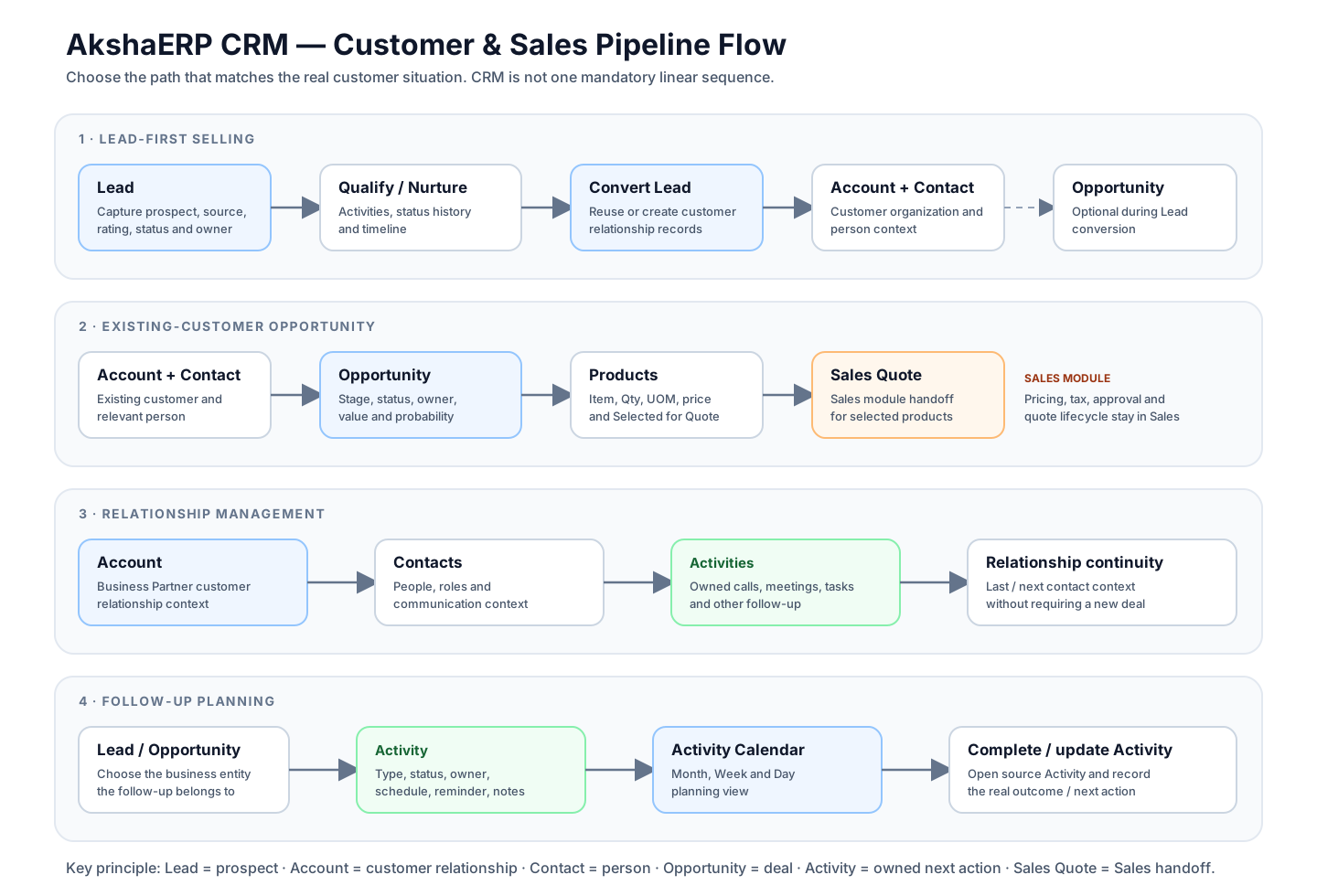
These are alternative operating paths. Existing customers do not need a new Lead for every Opportunity, and Accounts/Contacts can be maintained even when no immediate deal exists.
AkshaERP supports
AkshaERP CRM supports Lead capture and qualification, Account and Business Partner customer relationships, Contacts, configurable Opportunity pipelines, Activities and calendar planning, Opportunity Products, controlled Lead conversion and Sales Quote handoff.
- Lead capture with Source, Rating, Status, ownership, Tags and status history
- Controlled Lead conversion with Account / Contact reuse or creation and optional Opportunity creation
- CRM Accounts connected to shared Business Partner customer identity
- Account Contacts with role, communication and relationship context
- Opportunity Pipeline Stages, Status, expected value, probability and Lost Reason
- Opportunity Products with explicit Selected-for-Quote control
- CRM Activities for calls, meetings, tasks and other configured follow-up
- Month / Week / Day Activity Calendar planning
- Sales Quote creation handoff from selected Opportunity Products
START HERE
Choose the path that matches your customer situation
CRM becomes easier to understand when prospect qualification, customer identity, commercial deals and follow-up are treated as connected but different responsibilities.
Record the enquiry, source, rating, status, owner and follow-up before deciding whether to convert the prospect.
Open Lead guide →EXISTING CUSTOMERWork an Account and ContactMaintain the customer relationship and key people without creating duplicate customer identity outside Business Partner data.
Open Account guide →QUALIFIED DEALProgress an OpportunityControl the deal through Account, Pipeline Stage, Status, Products, Activities and Sales Quote handoff.
Open Opportunity guide →FOLLOW-UPPlan customer ActivitiesSchedule calls, meetings, tasks and other configured work against Leads or Opportunities and review it on the calendar.
Open Activity guide →TASK FINDER
What do you want to do?
Jump directly to the business task. Each function guide explains the active screen, fields, dropdown sources, validations, actions and downstream consequences.
OPERATING RHYTHM
Capture interest, progress deals and keep the next action visible
Prospect and customer context
- Leads and acquisition source
- Lead rating and status
- Account / Business Partner relationship
- Contacts and relationship details
- Owner assignment
Pipeline and commercial preparation
- Opportunity pipeline stage
- Opportunity status and probability
- Expected amount / close date
- Opportunity Products
- Selected-for-Quote handoff
Engagement and accountability
- Activities
- Calls / meetings / tasks
- Reminders and scheduling
- Activity Calendar
- Timeline and status history
CORE WORKFLOWS
Four paths explain how CRM is actually used
Not every customer interaction needs a new Lead or Opportunity. Choose the path that matches what is happening in the business.
WORKFLOW
Lead-first selling
Use when the person/company is still a prospect or enquiry and must be qualified before becoming an Opportunity.
WORKFLOW
Existing-customer opportunity
Use when the customer already exists and the new work is a specific commercial deal.
WORKFLOW
Relationship management
Use when the objective is to maintain the customer and key people even without an immediate deal.
WORKFLOW
Follow-up planning
Use when the business needs a visible owned next action against a Lead or Opportunity.
RESPONSIBILITIES
Who controls what?
AkshaERP keeps qualification, relationship ownership, deal ownership and follow-up separate so the system can explain who was responsible for each business event.
Captures Lead quality, source, status, ownership and follow-up evidence before conversion.
Maintains Account and Contact context and keeps the right customer/person attached to commercial work.
Maintains stage, status, value, probability, products and the Sales Quote handoff.
Creates and completes Activities so calls, meetings and tasks remain visible and auditable.
FUNCTIONS
CRM functions grouped by business responsibility
Use these guides for the detailed active user behavior behind each core record.
Prospect qualification
Capture and progress early interest before it becomes a controlled commercial deal.
Customer relationship
Keep organization and person context connected to shared Business Partner identity.
Sales pipeline
Control qualified deals through stages, products, probability and quotation handoff.
Customer follow-up
Create owned, scheduled and entity-linked work rather than relying on memory or private notes.
END-TO-END MAP
See the CRM relationship and pipeline flow
The visual map separates prospect qualification, customer identity, commercial pipeline and follow-up rather than forcing CRM into one linear sequence.
REFERENCEUnderstand the rules behind CRMRecord boundaries, handoffs, classifications and recovery
1. Why CRM uses separate Lead, Account, Contact and Opportunity records
AkshaERP separates prospect qualification, customer identity, individual people and commercial deals because they answer different business questions.
A Lead can disappear from the active prospect pipeline after conversion without deleting the customer Account. One Account can have many Contacts. One Account can have many Opportunities over time. That separation preserves history and prevents CRM from treating “customer”, “person” and “deal” as the same thing.
CRM business boundaries
| Question | Record | What it means |
|---|---|---|
| Who might become a customer? | Lead | A prospect/enquiry still being qualified or nurtured. |
| Which organization/customer relationship is this? | Account | The CRM relationship around the shared Business Partner identity. |
| Which person are we dealing with? | Contact | A person associated with the Account. |
| What specific commercial deal are we trying to win? | Opportunity | A pipeline-controlled commercial deal with value, probability and product context. |
| What should someone do next? | Activity | An owned call, meeting, task or other configured customer action. |
| What are we formally offering commercially? | Sales Quote | A Sales-module document created from selected Opportunity Products when ready. |
2. How CRM records connect and what moves forward
Source-to-target handoff
| Relationship | What carries forward | What still requires review |
|---|---|---|
| Lead → Account / Contact | Lead/company/contact identity can be used to create or select customer relationship records during conversion. | Confirm whether the customer/contact already exists to avoid duplicate identity. |
| Lead → Opportunity | Opportunity Name, expected value and starting pipeline/status context can be prepared during conversion. | The Opportunity remains a distinct commercial deal with its own Account, stage, status and owner requirements. |
| Account → Contact | The Account determines the Business Partner/customer under which the person belongs. | Confirm the person belongs to the correct customer before saving; existing Contact Account is intentionally fixed. |
| Account / Contact → Opportunity | Customer Account is mandatory and the selected Contact provides person-level context. | Changing Account clears Contact so users must choose a valid Contact for the new customer. |
| Opportunity Products → Sales Quote | Selected product lines, quantities, UOM, price/totals and Opportunity/customer source context are prepared for Sales Quote creation. | Sales Quote must still be reviewed under the Sales module commercial controls. |
| Lead / Opportunity → Activity | The Activity stores Entity Type and Entity ID and appears in entity follow-up history/calendar where applicable. | Choose the correct entity before save; established entity relationships are locked in the active Activity form. |
3. Stage, Status, Rating and Priority are different concepts
CRM uses several classifications because one field cannot answer every operational question. Keep these meanings separate when configuring or reporting CRM.
Classification meanings
| Concept | Used on | Question it answers |
|---|---|---|
| Lead Status | Lead | Where is the prospect in qualification/conversion lifecycle? |
| Lead Rating | Lead | How promising or important does the prospect appear? |
| Pipeline Stage | Opportunity | Where is the commercial deal in the selling process? |
| Opportunity Status | Opportunity | What is the overall state/outcome of the deal? |
| Activity Status | Activity | What happened / where is this follow-up work? |
| Activity Priority | Activity | How urgent/important is this follow-up relative to other work? |
4. Lead conversion is a controlled relationship transition
Lead conversion is intended to avoid retyping customer identity while preserving the difference between the prospect record and the records used after qualification.
The reviewed conversion supports reusing or creating Account/Business Partner context, reusing or creating Contact context, optionally creating an Opportunity, marking the Lead converted and opening the appropriate downstream record.
5. Responsibility handoffs – what each user should verify
CRM handoff checklist
| Owner | Verify before handoff | Result |
|---|---|---|
| Lead owner | Lead identity, source, status, rating, description, contactability and whether the prospect is actually ready to convert. | A meaningful qualification decision rather than premature conversion. |
| Conversion user | Whether Account/Contact already exist and whether an Opportunity is actually required. | No unnecessary duplicate customer/contact/deal records. |
| Account manager / sales owner | Correct Account, relevant Contacts, relationship dates and customer context. | Reliable customer relationship record. |
| Opportunity owner | Correct Account/Contact, stage, status, expected value/date, probability, Lost Reason when applicable and Product scope. | Reliable sales pipeline and forecast context. |
| Activity owner | Correct entity, type, status, schedule/reminder and notes/outcome. | Visible next action and auditable customer follow-up. |
| Sales user | Only quote-ready Opportunity Products are Selected and customer context is correct. | A Sales Quote created from deliberate CRM scope, then reviewed under Sales controls. |
6. Recovery – what to do when CRM context is wrong
Common recovery situations
| Situation | Correct response | Avoid |
|---|---|---|
| Lead information is wrong before conversion | Correct the Lead while it is still the prospect source and keep status/history meaningful. | Creating a second Lead for the same prospect merely to hide an error. |
| Lead was converted but customer already existed | Review the created/reused Account/Contact result before adding more downstream history; correct duplicates through controlled customer-master cleanup. | Renaming one customer record to impersonate another. |
| Account belongs to wrong customer | Do not repurpose a used Account. Correct the relationship through the customer-master process and preserve history. | Changing a used Account into a different organization. |
| Contact belongs to wrong Account | Create/correct the Contact under the right Account; existing Contact Account is intentionally fixed. | Moving CRM history by editing the Account relationship. |
| Opportunity has wrong Contact after Account change | Select a Contact belonging to the current Account. | Forcing stale Contact context from another customer. |
| Opportunity Product should not be quoted yet | Clear Selected for Quote on that line. | Deleting useful pipeline product context simply to keep it off the current quotation. |
| Activity is linked to wrong entity | Create the correct Activity against the right entity and preserve/retire the erroneous history according to operational policy. | Silently reassigning an established Activity relationship. |
7. Module boundaries and auditability
Business Partner Management remains the foundation for customer and person identity. CRM adds sales ownership, relationship, pipeline and engagement context around that shared identity.
Sales Quote remains a Sales document. CRM can prepare the source customer and selected Opportunity Products, but quotation pricing, tax, approval and later Sales processing remain governed by Sales.
Quick Call, Email and WhatsApp actions help users contact a Lead/Contact. When the business needs auditable follow-up, create or update a CRM Activity so ownership, schedule, status and notes remain part of the system record.
FAQ
Common CRM questions
Must every Opportunity start from a Lead?
No. Lead conversion is one supported path, but an Opportunity can also be created for an existing CRM Account.
What is the difference between an Account and a Contact?
Account represents the organization/customer relationship. Contact represents a person associated with that Account.
Can an Opportunity create a Sales Quote?
Yes. Save the Opportunity, make sure its Account resolves to the customer Business Partner, mark at least one Opportunity Product as Selected for Quote, then use Create Sales Quote.
Can Activities be linked only to Leads?
No. The reviewed Activity screen supports entity-driven linking including Leads and Opportunities.
Does the Activity Calendar replace Activity maintenance?
No. Calendar is a planning and navigation view over Activities. The Activity record remains the source for subject, type, status, owner, schedule and related entity.
NEXT STEP
Start with the record that matches the real customer situation
Use Leads for unqualified prospects, Accounts/Contacts for established relationships, Opportunities for specific deals and Activities for owned follow-up work.