
AkshaERP · Purchases
Purchases & Procurement
Connect internal demand, supplier competition, Purchase Orders, physical receipt, supplier invoicing and Return-to-Supplier controls without losing the business reason behind each transaction.
CHOOSE A PROCUREMENT PATH
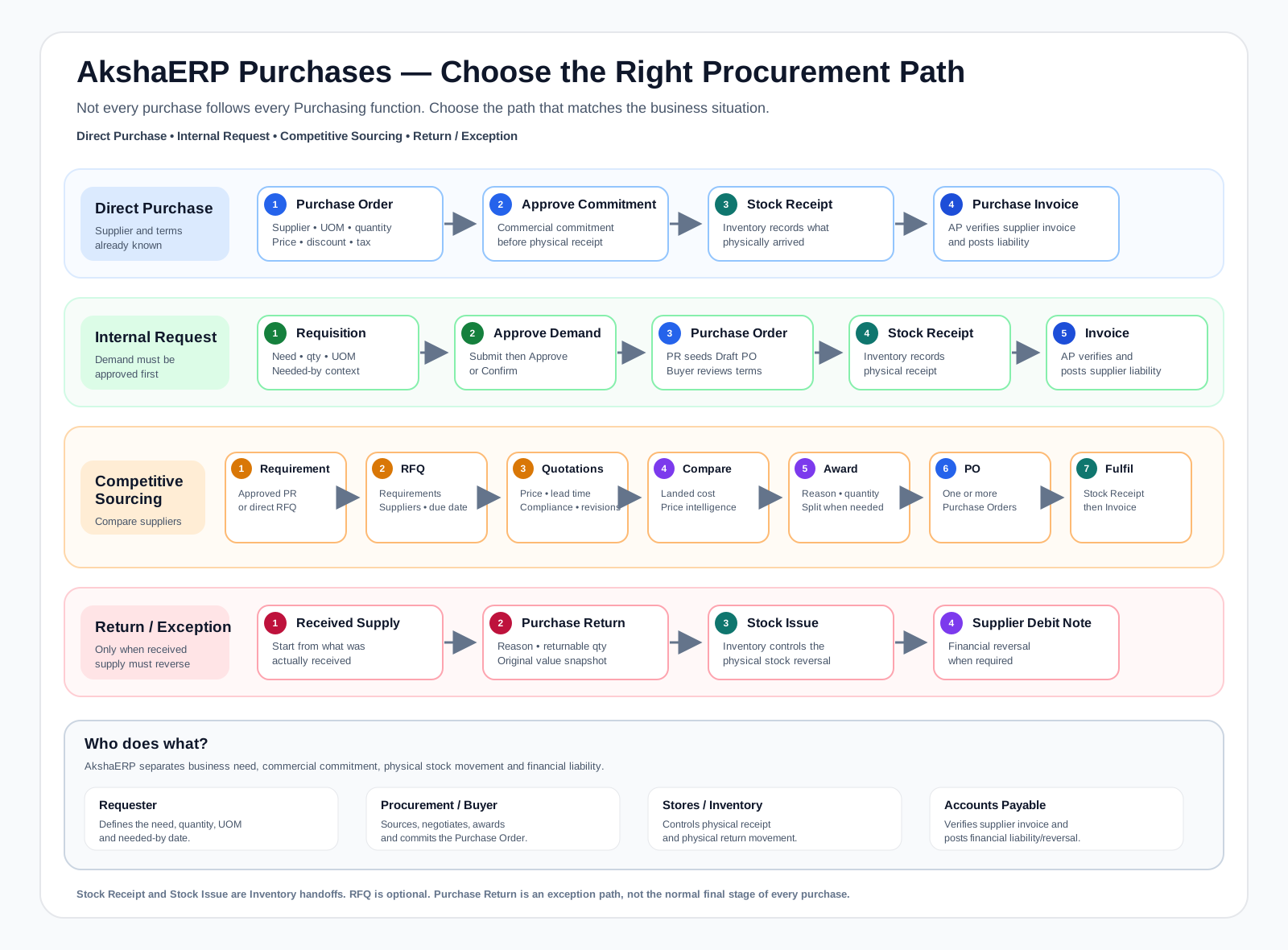
These are alternative operating paths, not eight mandatory sequential steps. Direct purchases can start at Purchase Order, RFQ is optional, and Purchase Return is an exception path.
AkshaERP supports
AkshaERP Purchasing supports internal requisitions, direct purchasing, multi-supplier RFQs, supplier quotations and controlled revisions, landed-cost and compliance comparison, split supplier awards, Purchase Orders, inventory receiving, supplier invoicing, Purchase Returns and supplier debit recovery.
- Purchase Requisitions and internal demand approval
- Direct Purchase Orders when competitive sourcing is not required
- Multi-supplier RFQs and supplier invitation tracking
- Supplier Quotations, compliance and negotiation revisions
- Landed-cost comparison, L1 context and documented award reasoning
- Split awards that can create multiple Purchase Orders
- Inventory Stock Receipt before PO-linked invoicing
- Purchase Invoices, Purchase Returns, Stock Issue and Supplier Debit Note recovery
- Cross-document Process Order and Traceability controls
START HERE
Choose the path that matches your responsibility
Purchasing is easier to understand when internal demand, sourcing, ordering and financial fulfillment are treated as connected but different jobs.
Raise a Purchase Requisition with supplier, needed-by date, location and item requirements before a supplier commitment exists.
Open requisition guide →Competitive sourcingSource with an RFQInvite multiple suppliers, collect controlled quotations, negotiate revisions and compare landed cost, compliance and delivery.
Start RFQ workflow →BuyerPlace and fulfill an orderCreate the Purchase Order, resolve pricing and tax, approve it, receive stock and hand the received PO to supplier invoicing.
Open Purchase Order guide →Stores / AccountsReturn received goodsReturn only the remaining received quantity, post the stock return and create the supplier debit when required.
Open return guide →TASK FINDER
What do you want to do?
Jump to the business task you need. Each function guide explains its fields, dropdown values, statuses, actions and downstream effects.
OPERATING RHYTHM
Know what is maintained, procured and financially completed
Supplier and commercial foundation
- Supplier business partner
- Addresses and contacts
- Pricing source and Purchase Price Lists
- Payment Terms
- Financial Dimensions and user Location defaults
Demand, sourcing and commitment
- Purchase Requisition
- RFQ and supplier invitations
- Supplier Quotations and revisions
- Comparison and Award
- Purchase Order approval
Receipt, invoice and exception control
- Inventory Stock Receipt
- Purchase Invoice posting
- PO -> Invoiced traceability
- Returnable quantity review
- Stock Return and Supplier Debit Note
CORE WORKFLOWS
Four paths explain how Purchasing is actually used
Choose the path that matches the business situation. A purchase does not have to pass through every Purchasing function.
WORKFLOW
Direct purchase
Use when supplier and commercial terms are already known and competitive sourcing is not required.
WORKFLOW
Internal request purchase
Use when the business must approve demand before the buyer creates the supplier commitment.
WORKFLOW
Competitive sourcing
Use when multiple supplier responses should be compared and the award decision must be auditable.
WORKFLOW
Return / exception
Use only when received supply must be physically and, where applicable, financially reversed.
RESPONSIBILITIES
Who does what?
AkshaERP keeps demand approval, supplier commitment, physical stock movement and financial posting separate so the right team controls each business event.
Raises the Purchase Requisition, explains what is needed, how much is needed, the correct UOM and when it is required.
Runs RFQs and negotiations when needed, evaluates suppliers, documents award reasoning and approves the Purchase Order commitment.
Records what physically arrived and what physically leaves during a supplier return. Stock Receipt and Stock Issue remain Inventory controls.
Verifies the supplier invoice after receipt, posts tax/accounting effects and processes supplier debit consequences for approved returns.
FUNCTIONS
Explore Purchases by business responsibility
Supplier foundation
Maintain the party that receives RFQs, Purchase Orders, invoices and returns.
Internal demand
Capture and approve what the business needs before a supplier commitment.
Competitive sourcing
Run the supplier competition from common requirements through an auditable award.
Ordering and receipt
Commit the purchase and hand the Approved order to Inventory for physical receipt.
Supplier accounting
Convert received supplier value into a posted financial obligation.
Returns and recovery
Reverse received supply without exceeding what remains physically returnable.
END-TO-END MAP
See the four procurement paths at a glance
The map separates Direct Purchase, Internal Request, Competitive Sourcing and Return / Exception so new users can see which functions are optional, which are handoffs, and where each team becomes responsible.
REFERENCEUnderstand the rules behind PurchasingDocument relationships, control points, handoffs, status rules and recovery
1. Why Purchasing uses separate documents
AkshaERP separates business need, supplier selection, commercial commitment, physical stock movement and financial liability because they are different business events controlled by different people.
A later document should not be treated as proof that an earlier business event happened correctly. For example, a Purchase Order proves the commercial commitment; Stock Receipt proves what physically arrived; Purchase Invoice proves the supplier liability that Accounts Payable accepted and posted.
Business event and control boundary
| Business event | Document / function | What it means |
|---|---|---|
| Need identified | Purchase Requisition | The business has requested goods/services. No supplier commitment exists yet. |
| Supplier competition opened | RFQ | Common requirements have been released to selected suppliers for comparable responses. |
| Supplier response recorded | Supplier Quotation | A supplier commercial/technical response exists with price, charges, lead time and compliance context. |
| Supplier selected | RFQ Award | The buyer has documented which supplier/quantity is selected and why. |
| Commercial commitment approved | Purchase Order | AkshaERP now has the controlled commitment to buy from the supplier. |
| Goods physically received | Inventory Stock Receipt | Inventory records what actually arrived at the operating location. |
| Supplier liability posted | Purchase Invoice | Accounts Payable has accepted the supplier invoice and financial posting has occurred. |
| Received goods must leave stock | Purchase Return + Stock Issue | A controlled exception reverses physical supply back to the supplier. |
| Supplier obligation must reduce | Supplier Debit Note | The financial consequence of the approved return is recorded where required. |
2. How documents connect and what moves forward
AkshaERP carries source information forward to reduce re-entry, but the receiving document remains responsible for its own business decision. Copied data is a starting point, not permission to skip review.
Source-to-target handoff
| Relationship | What AkshaERP carries forward | What the next owner must still verify |
|---|---|---|
| Purchase Requisition → Purchase Order | Supplier where present, active lines, requested quantity, UOM, estimated commercial values, needed-by context, organization/location and source requisition reference. | Final supplier commitment, quantity/UOM, negotiated Unit Price, discounts, tax, delivery terms and payment terms. |
| RFQ / Award → Purchase Order | Awarded supplier and quantity plus the selected sourcing/commercial basis; split awards can produce more than one PO. | The generated PO is still the commercial commitment. Review supplier, awarded quantities, pricing/tax, delivery and terms before approval. |
| Purchase Order → Stock Receipt | PO/supplier/location references and ordered line context are available to Inventory. | Record what physically arrived. For partial, rejected, batch/serial or other receiving differences, use the manual receipt path rather than assuming PO quantity equals received quantity. |
| Purchase Order → Purchase Invoice | Supplier, PO reference, location, payment terms, currency/exchange rate, pricing source/list and line Item, UOM, quantity, price, discounts, tax, Batch and totals are seeded where available. | Vendor Invoice #, actual invoice quantities/values, tax, freight/other adjustments, due terms and financial dimensions before posting. |
| Received purchase → Purchase Return | PO/receipt/invoice source references, Item, Batch, UOM, received quantity, prior returns, returnable quantity and original purchase pricing/tax snapshot. | Return reason, actual Return Qty and whether both physical stock reversal and supplier financial debit are required. |
3. Status is a control boundary, not a label
Statuses determine editability, eligibility for downstream processing and whether simple reversal actions are still safe. The exact lifecycle differs by function, but the control principle is consistent: once a downstream physical or financial event exists, AkshaERP becomes more restrictive.
Major status/control patterns
| Document | Editable / preparation state | Business boundary | Downstream / recovery significance |
|---|---|---|---|
| Purchase Requisition | DRAFT; REJECTED can be corrected and resubmitted where allowed. | SUBMITTED awaits decision; APPROVED authorizes procurement to proceed. | Approved demand can seed a PO. Unconfirm/Cancel are controlled by current status and downstream use. |
| RFQ | DRAFT while requirements and supplier list are prepared. | APPROVED then OPEN starts the supplier response period; CLOSED ends submissions. | EVALUATED/AWARDED records the sourcing decision. Cancellation is restricted once the award has progressed. |
| Supplier Quotation | DRAFT while the supplier response is entered. | SUBMITTED makes the quotation comparison-ready. | Negotiation should use controlled revisions so prior submitted versions remain auditable rather than being overwritten. |
| RFQ Award | DRAFT while allocation and reasoning are prepared. | APPROVED records the award decision. | PO_CREATED indicates Purchase Orders were generated; one award may create multiple POs for split quantities. |
| Purchase Order | DRAFT while the commercial commitment is prepared. | APPROVED is the commitment boundary in the active flow. | Receipt moves the process into physical execution. Unconfirm is blocked when active Stock Receipt or Purchase Invoice dependencies exist. |
| Purchase Invoice | DRAFT while AP verifies supplier invoice details. | POSTED is the financial boundary in the active screen. | Posting finalizes tax/accounting effects and supplier balance; later correction requires controlled financial reversal rather than editing history. |
| Purchase Return | DRAFT while return source, reason and quantities are reviewed. | Confirm/Approve locks the return for downstream execution. | After Stock Issue or supplier-debit posting begins, simple cancellation is intentionally restricted and reversal must follow downstream controls. |
4. Process Order versus manual processing
Process Order is orchestration: it can execute a sequence of already-defined business steps when the transaction is straightforward. It does not remove the need for physical verification, commercial review or Accounts Payable judgement.
For Purchase Orders, the workflow can progress through PO approval, Stock Receipt creation, receipt, posting, Purchase Invoice creation and invoice posting. Existing downstream documents are detected and reused where possible; conflicting multiple active receipts are treated as a blocker rather than guessed around.
For Purchase Returns, the workflow can progress through Confirm Return, Create Stock Issue, Ship Stock Issue, Post Stock Issue, Create Supplier Debit Note and Post Supplier Debit Note.
Choose automation or manual control
| Situation | Recommended path | Why |
|---|---|---|
| Full, clean PO delivery and invoice follows the source cleanly | Process Order can be appropriate after review. | The straight-through stages match the actual business events. |
| Partial delivery | Manual Stock Receipt. | Process Order PO receipt creation can map PO quantity as received quantity; physical receipt must reflect what actually arrived. |
| Rejected / short / excess / batch or serial differences | Manual receiving. | Inventory staff must capture the real receiving evidence and controls. |
| Supplier invoice differs from PO/receipt | Manual Purchase Invoice review. | AP must review quantity/value/tax/adjustments instead of auto-posting assumptions. |
| Freight, insurance, withholding, rounding or other invoice adjustments need judgement | Manual Purchase Invoice. | Adjustments change the financial result and should be reviewed before posting. |
| Return requires physical and financial reversal with no exception | Purchase Return Process Order can orchestrate the standard stages after review. | The workflow preserves the expected Stock Issue and Supplier Debit dependency chain. |
| A user needs to stop between stages for verification | Process manually to the required control point. | Automation should not bypass an intentional operational handoff. |
5. Responsibility handoffs – what each team should verify
The safest procurement process is a sequence of clear handoffs. Each owner should validate the evidence relevant to that stage before the next team becomes responsible.
Operational handoff checklist
| Owner | Verify before handoff | Handoff / result |
|---|---|---|
| Requester | Business need, correct Item/description, Quantity, UOM, Needed By Date, location/context and justification. | An accurate Purchase Requisition that Procurement can evaluate. |
| Approver | Need is valid, quantity/UOM make sense, timing is justified and policy/budget approval is appropriate. | Approved demand; no supplier commitment yet. |
| Procurement / Buyer | Supplier, quantity/UOM, negotiated Unit Price, discounts, tax, Price List/source where used, delivery location/date, payment terms and award reasoning when competitive sourcing is used. | Approved Purchase Order – the commercial commitment. |
| Stores / Inventory | What physically arrived, accepted/rejected quantity, UOM, Batch/Serial where applicable and receiving location. | Posted Stock Receipt representing physical reality. |
| Accounts Payable | Supplier/Vendor Invoice #, receipt evidence, invoiced quantity/UOM, price, tax, adjustments, payment terms/due context and financial dimensions. | Posted Purchase Invoice – supplier liability and accounting result. |
| Return initiator / Stores | Return reason, Returnable Qty, actual Return Qty, source Batch/UOM and physical goods being sent back. | Controlled Purchase Return and Stock Issue. |
| Accounts Payable – return | Whether supplier financial balance must reduce and which source invoice/return relationship applies. | Supplier Debit Note / financial reversal where required. |
6. Recovery – what to do when something goes wrong
Correction depends on how far the transaction has progressed. Prefer fixing a Draft before it creates downstream evidence. After physical or financial posting, use the controlled business reversal rather than editing history to make it look as though the original event never happened.
Common recovery situations
| Situation | Correct response | Avoid |
|---|---|---|
| Wrong Purchase Order before receipt | Correct the Draft, or Unconfirm an Approved PO only when the action is allowed and no downstream receipt/invoice dependency exists. | Creating offsetting documents when a safe pre-execution correction is still available. |
| Supplier delivered only part of the PO | Use manual Stock Receipt and record actual received quantity. | Straight-through processing that assumes the full PO quantity arrived. |
| Receipt has already been created | Review/correct through the Inventory receiving controls and respect PO dependency rules. | Trying to Unconfirm the PO as though no physical event exists. |
| Supplier invoice differs from PO | Review and adjust the Draft Purchase Invoice based on real supplier/receipt evidence before posting. | Posting just because the invoice was seeded from the PO. |
| Purchase Invoice is already posted and is wrong | Use the applicable controlled AP/GL reversal/cancellation process for the installation. | Editing posted history or deleting accounting evidence. |
| Received goods must be sent back | Create Purchase Return using the source PO/receipt context and remaining Returnable Qty. | Manual stock reduction with no purchasing return traceability. |
| Purchase Return already created Stock Issue / supplier debit effects | Follow the controlled downstream reversal path. | Using simple Cancel Return after inventory/AP effects have begun. |
| Multiple active Goods Receipts exist during PO Process Order | Stop and review the receipts manually; resolve the business situation before continuing. | Allowing automation to guess which receipt is authoritative. |
7. Shared controls, module boundaries and traceability
Location, pricing, tax and Financial Dimensions are shared controls that connect Purchasing to the wider ERP. Location Type determines the operating location class and Location identifies the actual Branch, Store or Warehouse available in the installation.
Purchase Orders and Purchase Invoices can use the Pricing Engine, Item Masters or Pricing-then-Item fallback. A selected Price List matters when a Pricing Engine mode is active; manual pricing should be treated as an intentional commercial override, not an invisible fallback.
Tax preview/recalculation and final posting preserve tax snapshots rather than treating tax as a casual typed percentage. Business Unit and Cost Center provide financial attribution where configured.
Stock Receipt and Stock Issue belong to Inventory even when Purchasing launches them. Purchasing controls why the organization buys or returns; Inventory controls physical stock movement. Purchase Invoice and Supplier Debit consequences cross into Accounts Payable / General Ledger responsibilities.
FAQ
Frequently asked questions
Do I have to create an RFQ for every Purchase Order?
No. RFQ supports competitive sourcing, but Purchase Orders can also be created directly when your procurement policy allows it.
Can I create a Purchase Invoice before receiving the Purchase Order?
For an invoice linked to a Purchase Order, the current server validates receipt. Receive the Purchase Order through Stock Receipt/Goods Receipt first.
Does lowest price automatically win an RFQ?
No. L1/landed-cost ranking is visible, but compliance, delivery and documented business reasoning also matter. The advisory recommendation does not replace the buyer decision.
Where is physical receipt recorded?
In Inventory Stock Receipt. An Approved Purchase Order provides a Stock Receipt action that opens the Inventory receipt flow with the Purchase Order reference.
Can a Purchase Return be cancelled after stock is returned?
Not by the simple Cancel Return action. Once stock or supplier-debit posting has begun, controlled downstream reversal is required.
NEXT STEP
Start with the path your organization actually uses
If supplier and terms are already known, start with Purchase Order. If internal demand approval is required, start with Purchase Requisition. If supplier competition is required, start with RFQ. Use Purchase Return only for received-supply exceptions.